Instagram Font Generator – Change Your Bio & Caption Font (Copy & Paste)
Turn plain text into 100+ stylish fonts for your Instagram bio, captions and name — copy and paste in seconds. Free, no app needed.
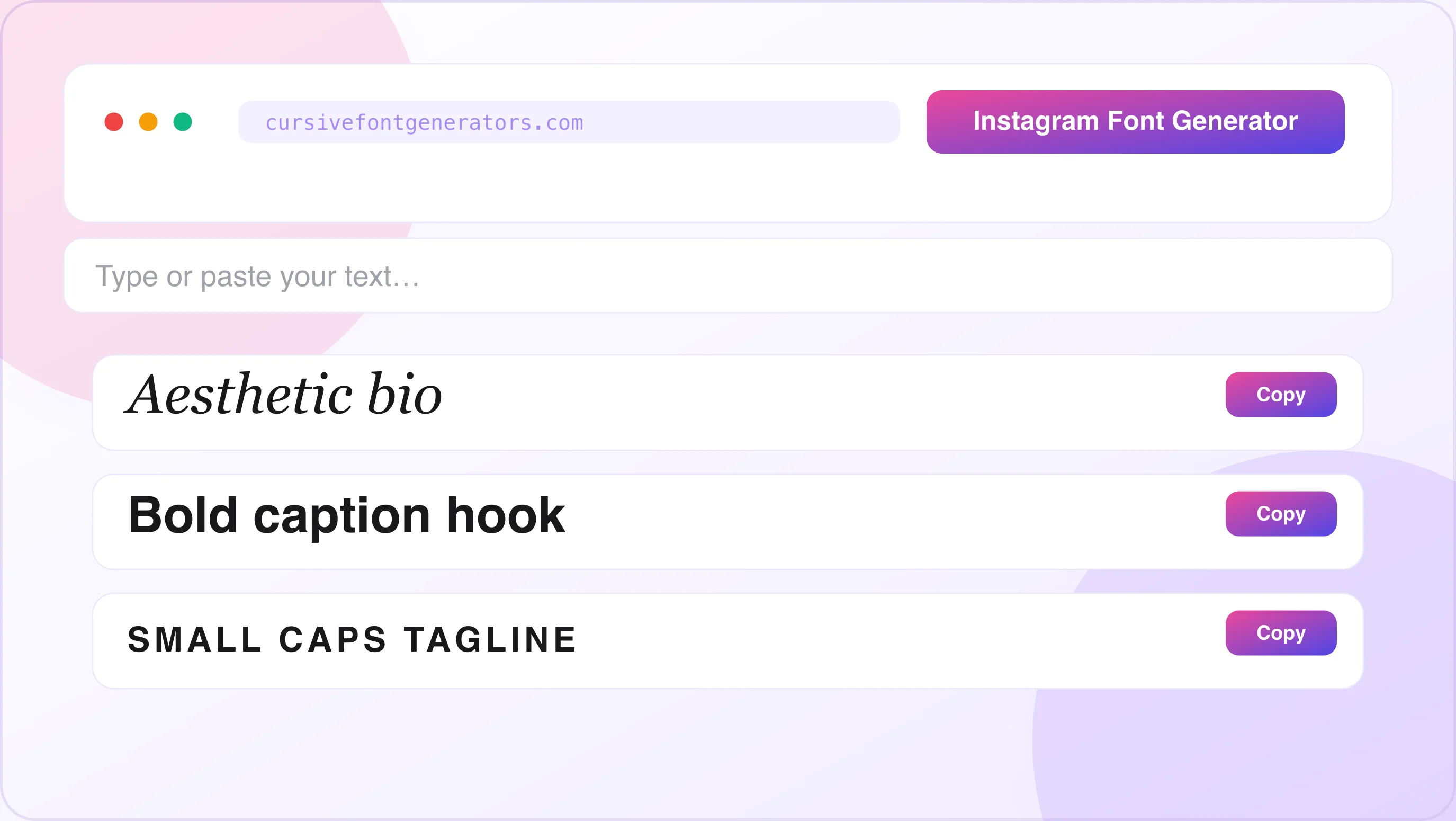
Instagram Font Generator
Type below and the tool generates dozens of styled font versions in real time — cursive, bold, gothic, bubble, small caps and more. Click Copy next to any style, then paste it into your bio, caption or name.
What Is an Instagram Font Generator?
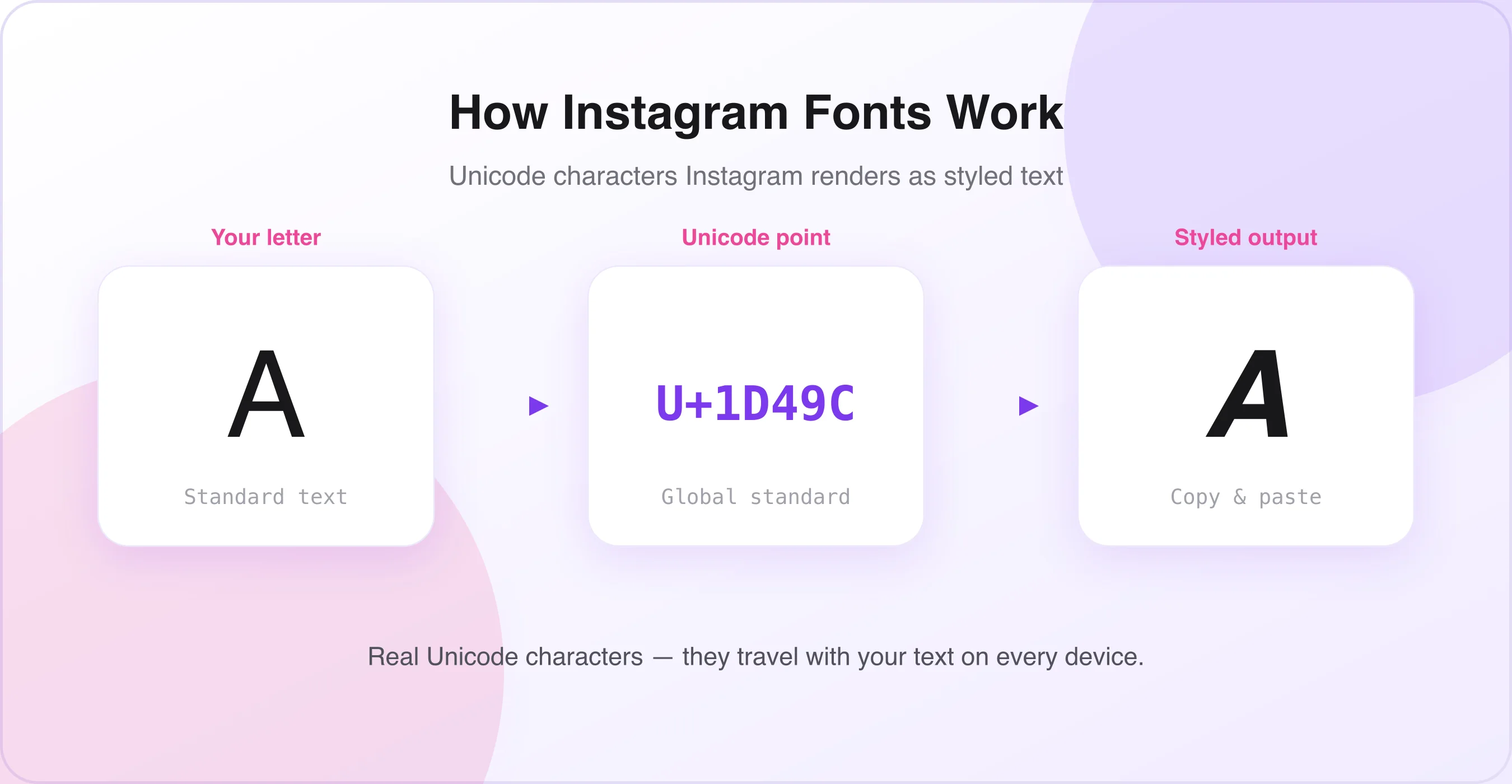
An Instagram font generator is a free online tool that transforms standard text into stylish Unicode characters. When you type a word into the generator, it replaces each letter with a Unicode symbol that looks like a different font style — cursive, bold, italic, gothic, strikethrough, upside-down, and more.
Because these are actual Unicode characters (not images or special app features), Instagram accepts them everywhere plain text is allowed: your bio, captions, comments, stories text, and even your display name. Wondering if these tools are safe to use? See is a cursive font generator safe?
How Unicode Fonts Work on Instagram
Unicode is an international text encoding standard that contains over 140,000 characters, including multiple mathematical and stylistic alphabets. Tools like bold serif (𝐁𝐨𝐥𝐝), italic (𝘐𝘵𝘢𝘭𝘪𝘤), script (𝓢𝓬𝓻𝓲𝓹𝓽), and Fraktur (𝔉𝔯𝔞𝔨𝔱𝔲𝔯) alphabets exist within Unicode as mathematical notation sets. Instagram renders these characters as styled text because they are valid Unicode — not because Instagram provides font options.
This is why the text appears formatted on every device and operating system without needing any special font installed.
Best Instagram Font Styles for Bio & Captions
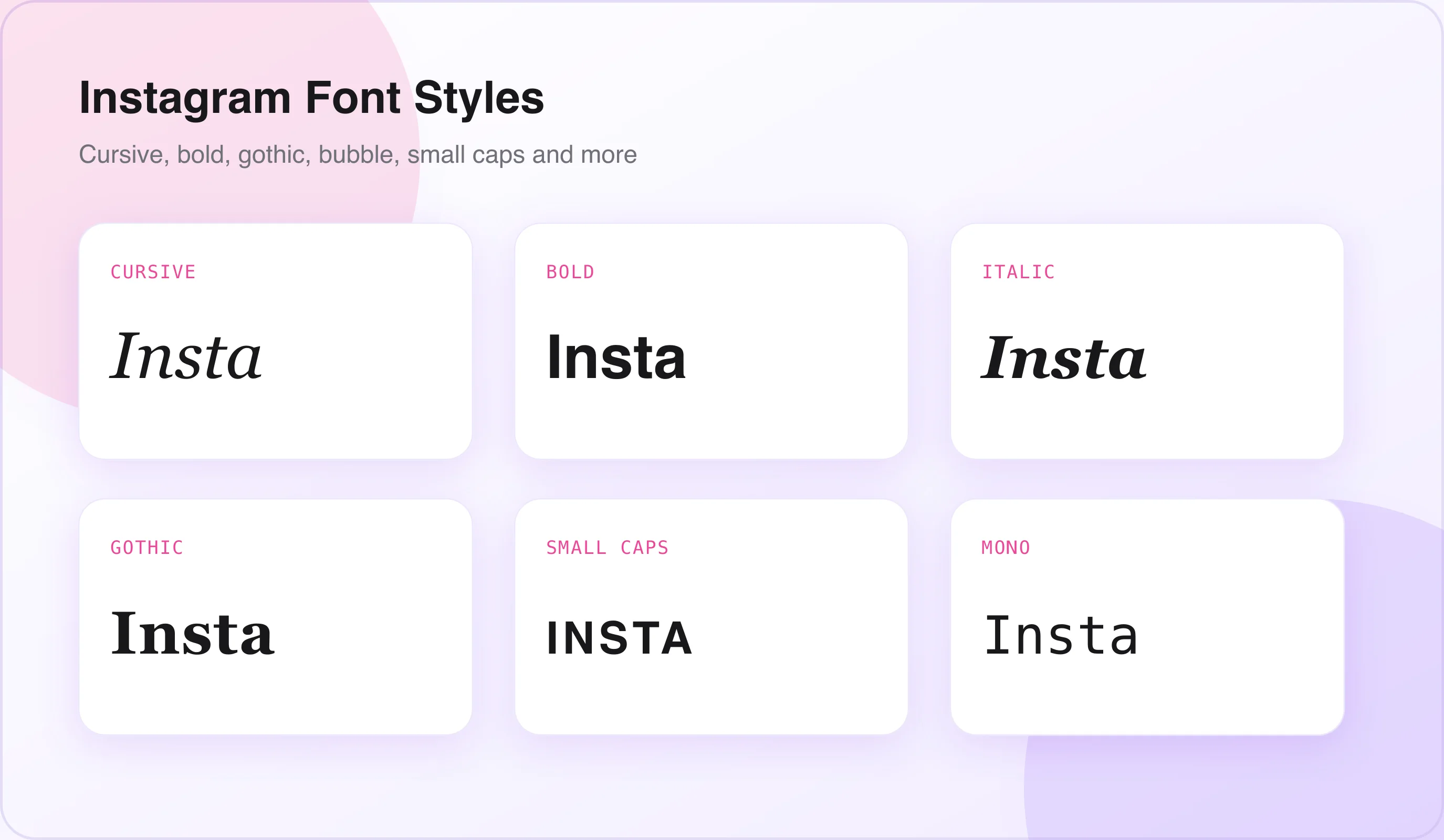
Different font styles create different moods and brand impressions. Here are the most popular styles and when to use them.
New to styling? Learn how to choose the right cursive style and the best font combinations before you build your bio.
Cursive & Script Fonts
Cursive and script fonts are the most popular choice for Instagram bios. They give a personal, elegant, and feminine touch that works perfectly for lifestyle, beauty, fashion, and personal brands.
Best for: Personal bios, beauty brands, wedding photographers, lifestyle accounts, motivational quotes in captions.
Bold & Italic Fonts
Bold and italic Unicode fonts draw attention to key phrases in captions and bios. Use our bold text generator to highlight your name, niche, or call to action. Italics add a magazine-style editorial feel.
Best for: Coaching profiles, fitness influencers, product launches, business accounts, caption headlines.
Gothic & Blackletter Fonts
Gothic and Fraktur-style fonts give a dramatic, dark, and artistic feel. They are popular in streetwear, music, tattoo art, and gaming niches.
Best for: Music artists, streetwear brands, tattoo artists, gaming pages, dark aesthetic accounts.
Bubble & Circled Fonts
Bubble fonts make text look fun, playful, and youthful. Circled text uses circle symbols around each letter for a unique badge-like appearance.
Best for: Kids and family accounts, food blogs, entertainment pages, meme accounts.
Small Caps & Tiny Fonts
Our small text generator produces small caps and tiny text fonts for a compact, subtle look. They are great for adding fine-print details, secondary lines in your bio, or creative aesthetic effects.
Best for: Aesthetic bios, secondary bio lines, location tags, minimalist accounts.
Strikethrough & Upside-Down
Strikethrough text adds a playful or ironic effect to captions. Flipped text creates curiosity and makes viewers stop scrolling. For something even more distorted, try our glitch text generator — a novelty effect for creative, quirky, or experimental accounts.
Best for: Humour, self-deprecating captions, comedy accounts, attention-grabbing first lines.
| Font Style | Best Used For |
|---|---|
| Cursive / Script | Personal & lifestyle bios, beauty brands, quotes |
| Bold & Italic | Business accounts, caption headlines, CTAs |
| Gothic / Blackletter | Music, streetwear, tattoo, gaming, dark aesthetics |
| Bubble / Circled | Kids & family, food blogs, meme accounts |
| Small Caps / Tiny | Aesthetic bios, secondary lines, minimalist feeds |
| Strikethrough / Flip | Humour, ironic captions, experimental pages |
How to Use an Instagram Font Generator – Step-by-Step
Changing your Instagram font takes less than two minutes. Follow these steps on any device.
Open the Instagram Font Generator Tool
Open any web browser on your phone or computer and go to an Instagram font generator (like the one on this page). No account, download, or login is required.
Type or Paste Your Text
Click inside the input box and type the text you want to convert — your name, bio tagline, caption text, motivational quote, or any phrase. The tool generates dozens of styled font versions in real time as you type.
Browse and Choose Your Font Style
Scroll through the list of generated font styles displayed below the input box. Each row shows your text converted into a different Unicode style. Styles are grouped by category — cursive, bold, gothic, bubble, and so on — making it easier to browse.
Copy the Styled Text
Click the Copy button next to your chosen font style, or manually select the converted text and press Ctrl + C (Windows) or Cmd + C (Mac). On mobile, tap and hold the text, then tap Copy.
Paste Into Instagram
For Bio: profile → Edit Profile → Bio field → paste. For Caption: start a new post → write your caption → paste the styled text. For Comments: tap the comment box → paste. For Display Name: Edit Profile → Name field → paste. Tap Done or Share to save.
Preview Before Publishing
Before hitting publish, always preview how the text looks on your profile. Check that the font renders correctly on both your phone screen and, if possible, a desktop browser. Some Unicode characters display slightly differently across older Android devices, so a quick preview saves you from publishing garbled text.
How to Change Your Instagram Bio Font
Your Instagram bio is 150 characters of prime real estate. A stylish font makes your bio memorable and reinforces your personal brand in the first three seconds a visitor lands on your profile.
Instagram Bio Font Character Limit Tips
Instagram allows 150 characters in the bio. Styled Unicode characters often count as one character each, but some composite characters (those combining multiple Unicode points) may count as two or more. If your styled bio is getting cut off:
- Use shorter, high-impact text and apply the fancy font only to key words.
- Mix styled text with regular text to stay within the limit.
- Test the bio on the app before finalising — the desktop version sometimes shows a different count.
How to Use Multiple Font Styles in One Bio
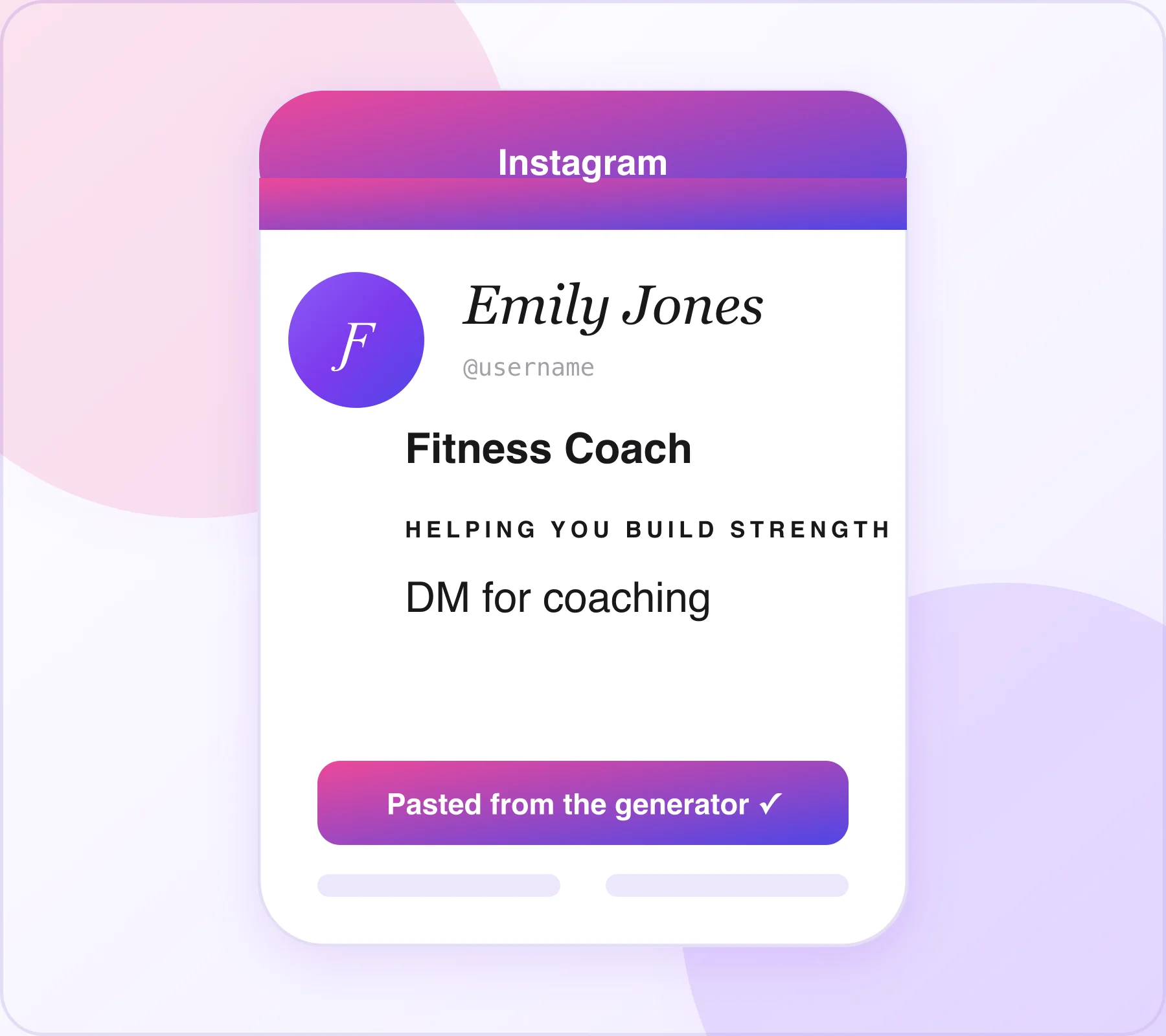
You can combine multiple font styles in a single bio by copying text from different font categories and pasting them together. For example: 𝓔𝓶𝓲𝓵𝔂 𝓙𝓸𝓷𝓮𝓼 (cursive for name) → 𝗙𝗶𝘁𝗻𝗲𝘀𝘀 𝗖𝗼𝗮𝗰𝗵 | 𝗡𝗲𝘄 𝗬𝗼𝗿𝗸 (bold for title) → ʜᴇʟᴘɪɴɢ ʏᴏᴜ ʙᴜɪʟᴅ ꜱᴛʀᴇɴɢᴛʜ (small caps for tagline) → DM for coaching (plain text).
This layered approach creates visual hierarchy in your bio and directs the reader's eye naturally from name → title → tagline → call to action.
How to Use Fancy Fonts in Instagram Captions
Instagram captions support all Unicode text, which means you can use styled fonts to structure long captions, emphasise keywords, and make your posts more readable.
Using Bold Text to Structure Instagram Captions
Use bold Unicode text to create a headline-style opening line in your caption. The first line of a caption appears as the preview text in feeds, so a bold opening grabs attention before the "more" truncation. Example: 𝗪𝗵𝘆 𝗜 𝗤𝘂𝗶𝘁 𝗠𝘆 𝟵-𝟱 𝗝𝗼𝗯 — followed by the rest of the caption in regular text.
Using Fonts in Captions for Quotes and Emphasis
Italic and script fonts work well for pulling out a quote or emphasising a key line within a longer caption. Example: 𝘠𝘰𝘶 𝘥𝘰𝘯'𝘵 𝘩𝘢𝘷𝘦 𝘵𝘰 𝘣𝘦 𝘱𝘦𝘳𝘧𝘦𝘤𝘵 𝘵𝘰 𝘴𝘵𝘢𝘳𝘵.
Caption Font Dos and Don'ts
Do: use bold fonts for the first line of captions to increase click-through on "more"; use cursive or italic for quotes and pull-out lines; mix styled text with plain text to maintain readability; use small caps for aesthetic spacing and minimalist vibes.
Don't: apply fancy fonts to every word in a caption (it becomes hard to read); use gothic or upside-down fonts for important information you want to be readable; use overly decorative fonts in captions targeting older audiences; ignore how the text renders on mobile — always check on your phone.
Instagram Font Generator for Name & Display Name
Your Instagram display name appears in bold directly below your profile picture and at the top of your bio. It is separate from your username (which cannot contain special characters). Since the display name field accepts Unicode text, you can use a font generator to style it — and it's the first thing visitors read.
How to Change Your Instagram Display Name Font
- Open Instagram and go to your Profile.
- Tap Edit Profile, then tap the Name field (not Username).
- Delete the current name.
- Open an Instagram font generator, type your name, choose a style, and copy.
- Return to Instagram and paste the styled name into the Name field.
- Tap Done → Submit.
Best Font Styles for Instagram Display Name
- Cursive Script — most popular for personal brands and creators.
- Bold Sans — great for business and professional accounts.
- Small Caps — minimalist and clean for aesthetic feeds.
- Bold Serif — editorial and premium feel for brands.
Top Free Instagram Font Generator Tools
LingoJam Instagram Fonts Generator
One of the oldest and most widely used. It generates over 100 font styles in real time, displays them in a clean scrollable list, and requires no account. Purely web-based and works on all mobile browsers. Best for: quick conversions, maximum variety, finding niche styles.
IGFonts.io
Purpose-built for Instagram. It organises font styles into categories (cursive, bold, cute, glitch, gothic), includes a one-click copy button for each style, and shows a live character count. Mobile-optimised. Best for: mobile users, category browsing, bio writing.
Fancy Text Generator
General Unicode text tools (fancytextguru.com, lingojam.com/FancyTextGenerator) with hundreds of styles. Often include extras like text-to-emoji, text art, and zalgo (glitch) text. Best for: unique and experimental fonts, glitch and zalgo aesthetics.
Picsart Text Generator
Includes Instagram-compatible fonts as part of its broader design suite. Adds visual previews showing how fonts look on a mock Instagram profile. Best for: visual planning, seeing fonts in context, design-focused creators.
Instagram Font Generator vs. Instagram's Native Text Tools
Instagram offers its own text tools in Stories and Reels — but these are completely separate from bio and caption fonts.
Instagram Stories & Reels Text Fonts
Inside Instagram Stories and Reels, Instagram provides a set of built-in typefaces for text overlays: Classic, Modern, Neon, Typewriter, Strong, and a few others. These are actual image-rendering fonts applied to the visual layer of your story — they do not produce Unicode text and cannot be used in bios or captions.
When to Use the Font Generator vs. Native Instagram Fonts
For bio and captions, a font generator is your only option. For stories and reels, use Instagram's built-in tools for the best integration with animations and stickers.
Instagram Fonts for Different Niches & Aesthetics
Aesthetic Instagram Fonts
Aesthetic accounts — VSCO, soft girl, dark academia, vintage — favour fonts that reinforce their visual identity. Popular choices: Small Caps for the clean, minimal, Tumblr-style aesthetic; Cursive Script for the soft, romantic aesthetic; Gothic / Fraktur for dark academia; Monospace for the retro tech / e-girl aesthetic.
Instagram Fonts for Business Accounts
Business and brand accounts should prioritise readability over decoration. Recommended: Bold Sans for headlines and the display name; regular text with small caps for the bio tagline; italic for quotes or testimonial lines. Avoid gothic, bubble, or upside-down fonts on professional accounts — they reduce perceived credibility.
Instagram Fonts for Food Bloggers & Lifestyle Accounts
Food and lifestyle creators use fonts that feel warm, approachable, and inviting: Cursive Script for recipe names and dish descriptions; Bubble fonts for fun, playful content; Bold serif for bold content pillars like "RECIPE" or "TRAVEL".
Instagram Fonts for Fitness & Motivational Accounts
Fitness influencers and motivational pages need fonts that feel powerful and energetic: Bold sans-serif for motivational quote openers; Bold italic for emphasis within captions; All caps Unicode for challenge posts and calls to action.
Common Problems with Instagram Font Generators (And Fixes)
Font Appears as Boxes or Question Marks
Problem: after pasting, some characters appear as □ or ?. Cause: the device or OS does not support the specific Unicode block used by that font style. Fix: choose a different font style — stick to bold, italic, script, and small caps, which have the broadest device support. Avoid obscure symbol sets.
Instagram Rejects the Text
Problem: Instagram shows an error or removes the text after saving. Cause: Instagram occasionally restricts certain Unicode ranges, particularly heavily decorated or symbol-heavy styles. Fix: try a cleaner, more standard font style (bold sans, italic, small caps) based on Unicode mathematical alphabets that Instagram has consistently supported.
Font Displays Differently on Different Phones
Problem: the text looks perfect on your iPhone but shows plain text or boxes on Android. Cause: Android and iOS ship with different system font files; older Android versions have incomplete Unicode coverage. Fix: test on multiple devices before publishing and stick to the most universally supported styles: bold, italic, cursive script, and small caps.
Character Count Is Wrong After Pasting
Problem: Instagram shows you have used more characters than expected. Cause: some Unicode characters are counted as two code points (a base character + a combining modifier), which Instagram counts as two. Fix: use simpler font styles, or apply styled fonts only to specific words rather than the full bio.
Styled Text Disappears After Updating the App
Problem: after an Instagram update, the styled text reverts to plain text. Cause: rare, but occasionally happens when Instagram re-validates profile fields after an update. Fix: re-paste the styled text using the same process and keep your font generator bookmarked.
Instagram Font Generator Tips & Best Practices
Use Fonts Strategically, Not Everywhere
The most effective bios and captions mix styled fonts with regular text. Apply fancy fonts to your name, niche or title, and tagline. Keep calls to action (like "DM for info" or "Link in bio") in plain text for maximum readability.
Match Font Style to Your Brand Personality
Your font choice should reinforce your brand. A children's education account using gothic fonts creates cognitive dissonance; a luxury brand using bubble fonts loses its premium positioning. Match the visual weight and feel of the font to your niche and audience expectations.
Combine Fonts with Emojis
Unicode fonts and emojis complement each other well. Use emojis as bullet points or separators between bio lines. Pair cursive script with floral or star emojis 🌸✨ for an aesthetic bio, or bold sans with fire and muscle emojis 🔥💪 for a fitness brand.
Keep Bio Readable on Mobile
Over 90% of Instagram usage is on mobile. Long lines of highly decorated text can become illegible on small screens. Write your bio in short lines of 3–5 words, use line breaks, and test every change on your phone screen before saving.
Save Your Favourite Styled Text for Reuse
Once you have found a styled font you love for your name or tagline, save it in a note on your phone (Apple Notes, Google Keep, Samsung Notes). If your bio ever gets reset, you can paste instantly without regenerating.
Use Font Variety in Caption Formatting
For long-form captions (100+ words): opening line in bold (acts as a headline, hooks readers before "more"); middle content in plain text (maximises readability); key phrase or quote in italic or cursive (creates a visual pause); closing CTA in plain text.
Frequently Asked Questions
?Is an Instagram Font Generator Safe to Use?+
Yes. An Instagram Font Generator is safe to use. It only changes your text into different styles. You do not need to log in, share passwords, or download anything.
?Will Instagram Ban Me for Using Instagram Fonts?+
No. Using an Instagram Font Generator is allowed. Instagram does not ban users for using stylish Unicode text in bios, names, captions, or comments.
?Can I Use an Instagram Font Generator on a Business Account?+
Yes. An Instagram Font Generator works on personal, creator, and business accounts. You can use it anywhere Instagram supports text.
?Why Don't Instagram Fonts Work in My Username?+
Instagram usernames only allow normal letters, numbers, dots, and underscores. So fonts from an Instagram Font Generator cannot be used in usernames. They work in display names and bios instead.
?Do Instagram Fonts Affect Search Results?+
No. Fonts from an Instagram Font Generator do not improve SEO or ranking. For better search results, use normal text for important keywords.
?Can I Use an Instagram Font Generator on Android and iPhone?+
Yes. An Instagram Font Generator works on both Android and iPhone. You just copy the text and paste it into Instagram.
?Are There Instagram Font Generator Apps?+
Yes. There are many Instagram Font Generator apps available. But most users prefer online tools because they are faster and do not need installation.
?Do Instagram Fonts Work in Instagram Messages?+
Yes. Text from an Instagram Font Generator works in Instagram Direct Messages (DMs). You can paste it like normal text.
?How Many Characters Can I Use in an Instagram Bio?+
An Instagram bio allows up to 150 characters. When using an Instagram Font Generator, check your text length carefully because styled characters may take extra space.
?Can I Use Instagram Fonts in Reels and Stories?+
An Instagram Font Generator works in captions, bios, comments, and messages. For text inside Stories or Reels, Instagram's built-in text tools work better.
Conclusion
An Instagram font generator is a quick and easy way to make your Instagram profile look more attractive. You do not need any design skills, special apps, or paid tools. Just type your text, choose a font style, copy it, and paste it into your Instagram bio, name, captions, comments, or messages.
The biggest advantage of an Instagram font generator is that it helps your profile stand out from others. Different font styles can show your personality, make your bio easier to read, and grab attention in captions. Whether you are a creator, business owner, influencer, or casual user, a font generator can improve your profile in just a few minutes. For the best results, use one main font for your name, keep important information easy to read, and preview everything on your phone before saving.
This tool is built on the same cursive font generator that powers every style on this site — head back to the homepage to explore all 100+ Unicode styles in one place.


Written & reviewed by
Daragh Boland
Editor & Typography Specialist
Daragh Boland is the editor of Cursive Font Generator. With a background in web typography and Unicode, Daragh writes and reviews every guide on the site — covering stylish text, font pairing, and how cursive and Unicode fonts work across Instagram, TikTok, Discord and beyond.
Connect with Daragh on Facebook →More free generators
Looking for the original tool? Open the free cursive font generator or browse all guides on the blog.